Un nouveau rapport met en lumière les activités malveillantes sur Discord, notamment autour des abonnements Discord Nitro qui représente une véritable opportunité pour les cybercriminels.
Pour rappel, Discord est un service en ligne très populaire pour échanger par chat ou par audio et il existe de nombreuses communautés sur des thématiques diverses et variées. Même si à ses débuts il était utilisé surtout par les gamers, ce n'est plus du tout le cas depuis plusieurs années. D'ailleurs, il y a le serveur Discord de la communauté IT-Connect ! Discord compte plus de 300 millions d'utilisateurs actifs. Forcément, s'il y autant d'utilisateurs sur cette plateforme, cela va attirer les cybercriminels.
Justement, un chercheur en sécurité de chez CyberArk Labs a fait la découverte d'un nouveau malware nommé Vare qui présente la particularité d'être distribué par l'intermédiaire de Discord. Il est associé à un groupe de pirates nommé Kurdistan 4455 basé au sud de la Turquie.
Discord Nitro, l'élément déclencheur
D'après ce chercheur, c'est depuis qu'il y a l'offre payante Discord Nitro qu'il y a des malwares sur Discord. Pourquoi ? Et bien, parce qu'en échange d'un abonnement payé mensuellement, l'utilisateur accède à des fonctions supplémentaires comme le chargement de fichiers plus lourds ou une qualité plus élevée pour le streaming.
De ce fait, il y a des utilisateurs qui essaient d'obtenir des clés d'activation Discord Nitro de manière gratuite et qui se font piéger. Certains d'entre eux s'essaient aussi au brute force ou au social engineering pour mettre la main sur les avantages Discord Nitro gratuitement. C'est pour cette raison qu'avec un malware, les pirates peuvent piéger les utilisateurs et leur voler des informations, notamment les coordonnées de cartes bancaires dans le but d'acheter des clés Discord Nitro : "Ces clés peuvent être échangées pour obtenir Discord Nitro, et des acteurs malveillants les vendent à des fins lucratives.", précise l'étude CyberArk.
Le malware Vare
Dans le cas présent, le malware Vare utilisé par les pirates informatiques est codé en Python puis converti en exécutable avec pyInstaller. Il agit uniquement sur Discord, que ce soit pour stocker les données exfiltrées ou pour trouver de nouvelles cibles.
Une fois la machine infectée, le malware Vare va être capable de voler des informations notamment dans Discord : jetons d'authentification, informations de paiement, statut du Nitro, ainsi que le numéro de téléphone associé au compte. Cela ne s'arrête pas là, car il va aussi se servir dans les navigateurs pour voler les mots de passe enregistrés et récupérer des informations sur la machine en elle-même (CPU, RAM, clés WiFi enregistrées, etc.). Ces fonctions correspondent à celles que l'on retrouve dans le malware Empyrean.
Cette recherche est intéressante, car elle montre que ce n'est pas simplement une guerre entre les cybercriminels d'un côté et les utilisateurs de l'autre. En effet, ici le groupe de cybercriminels Kurdistan 4455 va chercher à piéger d'autres personnes malveillantes : ce qui prouve que personne n'est à l'abri et que ce n'est pas qu'une question de positionnement !
Le rapport complet de CyberArk est disponible à cette adresse.
Des chercheurs en sécurité ont fait la découverte d'une nouvelle campagne qui s'appuie sur des vidéos YouTube pour diffuser des liens malveillants menant au malware Aurora, dans le but de voler des informations sur la machine infectée. Faisons le point.
Ce n'est que depuis la fin de l'année 2022 que l'on entend parler du malware Aurora. Codé en Go, l'objectif de ce logiciel malveillant est de voler des informations sur votre machine, notamment les identifiants enregistrés dans les navigateurs, dans le système, mais aussi le contenu d'un portefeuille de cryptomonnaie. Dans le même esprit que la menace RedLine.
L'entreprise de cybersécurité Morphisec a mis en ligne un rapport au sujet d'un nouveau loader nommé "in2al5d p3in4er" qu'il faut lire "invalid printer", dont l'objectif est de déployer le malware Aurora. Pour tenter de piéger des utilisateurs, les cybercriminels utilisent :
Des vidéos YouTube
Des sites web pour faire la promotion de logiciels crackés
Si l'on s'intéresse à la partie YouTube, on constate que si l'utilisateur clique sur un lien présent dans la description de la vidéo, il est redirigé vers un site malveillant où il est invité à télécharger un utilitaire (comme le promet la vidéo) sauf qu'il s'agit en fait du loader pour Aurora.
Les pirates s'appuient sur plusieurs chaînes YouTube pour distribuer les vidéos malveillants, notamment la chaine ci-dessous qui a été compromise. On peut voir une vidéo récente pour obtenir "Adobe Audition" ou "Adobe Animate" en version crackée. On voit aussi qu'il y a déjà eu plusieurs centaines de vues en quelques heures.
Il y a un réel effort fait sur les vidéos : vignettes de qualité et utilisation d'une IA pour générer les vidéos.
Il est à noter que l'exécutable malveillant (loader) a été compilé avec l'application Embarcadero RAD Studio, ce qui lui permettrait d'être plus difficilement détectable, avec une capacité à échapper aux bacs à sable et aux machines virtuelles.. À ce sujet, voici les précisions de l'entreprise Morphisec : "Ceux qui ont le taux de détection le plus bas sur VirusTotal sont compilés à l'aide de 'BCC64.exe', un nouveau compilateur C++ d'Embarcadero basé sur Clang".
Une nouvelle fois, la thématique des "logiciels crackés" est utilisée par les pirates informatiques. Un utilisateur qui cherchera à obtenir une version crackée d'un logiciel, pourra tomber sur une vidéo YouTube ou un site web malveillant, et finir par télécharger et exécuter le malware !
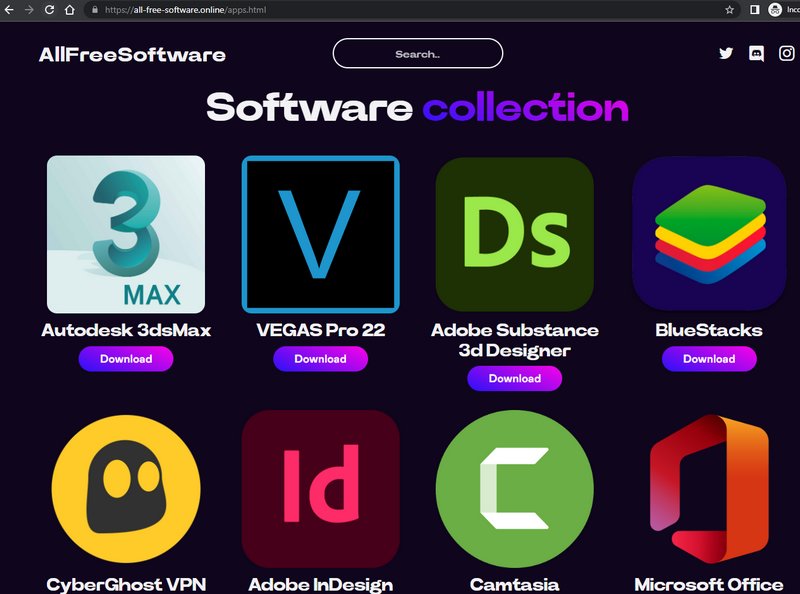
Comme le montre l'image ci-dessous, issue du rapport de Morphisec, des logiciels populaires sont utilisés comme leurre.
Des chercheurs ont fait la découverte d'un nouveau malware Android, surnommé Goldoson et distribué au travers d'environ 60 applications. Au total, le nombre de téléchargements est important : 100 millions !
100 millions d'installations, ce n'est pas rien, et c'est pourtant un chiffre réel si l'on se réfère au nombre de téléchargements cumulés de l'ensemble des applications concernées par cette affaire.
C'est d'autant plus inquiétant que, d'après les chercheurs de McAfee, à l'origine de la découverte de Goldoson, ces applications sont infectées par ce malware à cause d'une bibliothèque tierce infectée initialement. Cela n'est pas sans rappeler l'attaque supply chain qui a touché l'application 3CX pour Windows.
Que fait le malware Goldoson ?
Sur un appareil infecté, le malware Goldoson va collecter des données dans les applications installées, les appareils Bluetooth et WiFi (notamment les adresses MAC), ainsi que votre position GPS. Par ailleurs, il peut aussi cliquer sur des publicités à votre insu, en tâche de fond.
D'après l'analyse effectuée de ce logiciel malveillant, il se synchronise au serveur C2 des attaquants tous les deux jours. La première connexion au serveur C2 lui permet de récupérer sa configuration.
En fonction de l'application installée sur votre appareil et infectée par Goldoson, le malware a plus ou moins accès aux données de votre appareil : tout dépend des permissions demandées par l'application en question et de la version d'Android utilisée.
Depuis Android 11, il est plus difficile pour les applications de collecter des données de façon "illégale". Toutefois, d'après les chercheurs de McAfee, sur les versions plus récentes d'Android il reste efficace pour récupérer des données sensibles dans 10% des applications installées sur l'appareil.
Quelles sont les applications infectées ?
Certaines applications comptent très peu d'installations (moins de 10 000). Voici la liste des applications les plus téléchargées et infectées par Goldoson :
L.POINT with L.PAY - 10 millions de téléchargements
Swipe Brick Breaker - 10 millions de téléchargements
Money Manager Expense & Budget - 10 millions de téléchargements
GOM Player - 5 millions de téléchargements
LIVE Score, Real-Time Score - 5 millions de téléchargements
Pikicast - 5 millions de téléchargements
Compass 9: Smart Compass - 1 million de téléchargements
GOM Audio - Music, Sync lyrics - 1 million de téléchargements
LOTTE WORLD Magicpass - 1 million de téléchargements
Bounce Brick Breaker - 1 million de téléchargements
Infinite Slice - 1 million de téléchargements
SomNote - Beautiful note app - 1 million de téléchargements
Korea Subway Info: Metroid - 1 million de téléchargements
McAfee a pu signaler ce logiciel malveillant et ces applications à Google. Les développeurs, qui ont fait le choix de supprimer la librairie pour que leur application soit de nouveau saine, peuvent continuer à diffuser leur application sur le Play Store. Pour les autres, les applications sont supprimées du Play Store car elles ne sont pas conformes au règlement du magasin d'applications.
Si vous utilisez l'une de ces applications, vous devez effectuer la mise à jour immédiatement.
Microsoft 365 Wiper malware is a category of threat where attackers penetrate a tenant and remove data. In this article, we discuss if Microsoft 365 Wiper malware could remove all the files from SharePoint Online sites and what actions tenant administrators can take to defend against the apps that might wreak such havoc.
Contrairement aux attaques par rançongiciels, les stealers ou infostealers (information stealer ou voleur d’informations en français) sont pour le moment encore une menace méconnue du grand public. Il s’agit d’un logiciel espion utilisé pour récupérer des informations sur votre appareil, à votre insu. Il fouille votre ordinateur et transmet les données trouvées aux malfaiteurs. Cela peut aller d’un suivi de votre activité en ligne, au vol de mot de passe, voire une usurpation d’identité. Comment opère l’infostealer? Une fois installé […]
This time, a GitHub vulnerability has been identified proactively, not retroactively. Source: Pixabay
A Trend Micro investigation revealed that the “port forwarding” feature within GitHub Codespaces could allow cybercriminals to host and deliver malware. The researchers found that it’s possible to exploit the public sharing of forward ports to create a malware server. To do this, threat actors need a legitimate GitHub account to avoid getting flagged as suspicious. However, no incident exploiting the security vulnerability has occurred in the wild so far.
GitHub Codespaces, available since Nov. 2022, has been a popular choice among developers and large tech companies. It provides them with a container-based environment equipped with tools and dependencies for completing projects. Developers deploy Integrated Development Environment (IDE) platforms inside these virtual containers. This allows them to write, edit, and test code directly within the web browser.
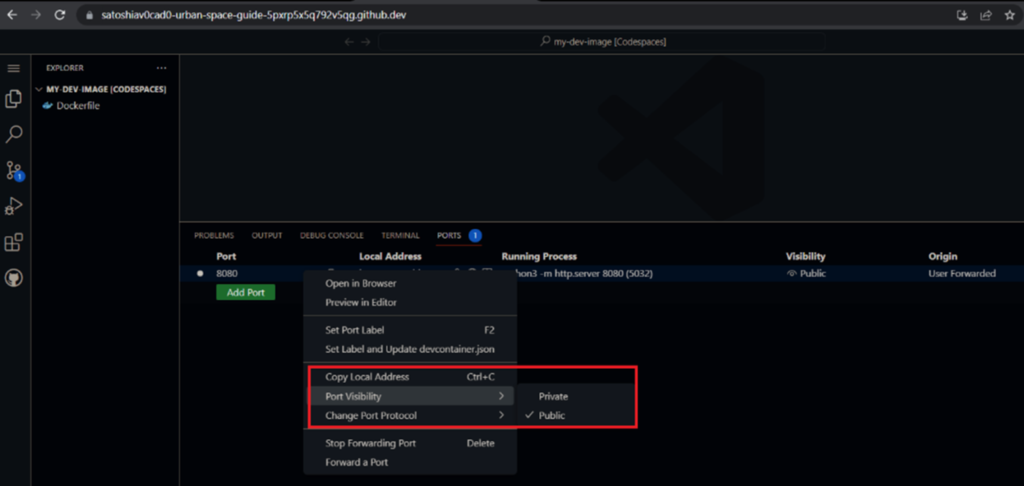
Setting ports to public can drastically increase the chances of a cybercrime event. Source: Trend Micro
While private ports forwarding requires cookies or tokens for authentication, a public port is available to just about anybody with access to the URL. According to Trend Micro’s investigation, the trouble with GitHub Codespaces is that when it allows public port forwarding via Transmission Control Protocol (TCP) for users to view and test applications, it also allows cybercriminals a means of entry.
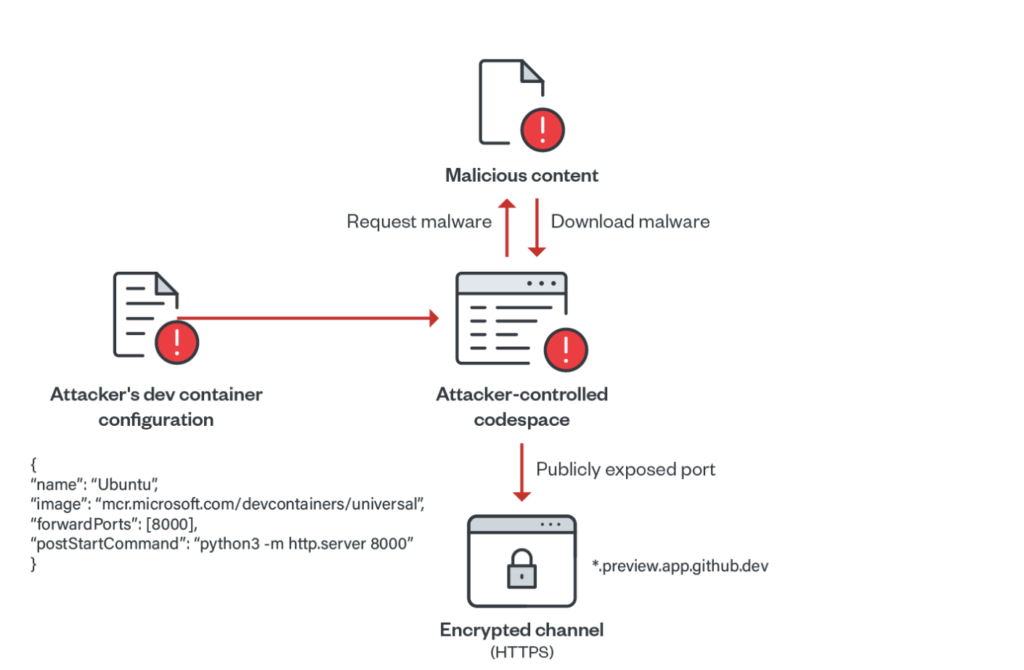
This enables threat actors to bypass suspicion from threat intelligence platforms. On GitHub Codespaces, ports are forwarded using HTTP. HTTP is less secure than HTTPS. With no malicious history showing, the malware flies under the radar. In Trend Micro’s simulated attack, researchers forwarded the port 8000 using forwardPorts property. Then, they ran a Python-based HTTP server on each successful container startup using the postStartCommand property.
Consequently, the researchers demonstrated how a cybercriminal could run a Python web server, upload malicious scripts to Codespace, and open a public web server port. After that, they used the URL to distribute malware to end users. Throughout the process, GitHub Codespaces didn’t start any authentication procedures.
This process is similar to how cybercriminals distribute malware on other reputable services, such as Microsoft Azure, Google Cloud, and Amazon AWS.
Using Dev Containers to Enhance Efficiency
Threat actors used the efficiency of GitHub Codespaces to further their own aims. Source: Trend Micro
Since dev containers within GitHub have all the tools and dependencies used in projects, developers have come to rely on them for rapid deployment. But, at the same time, the same dev containers also help cybercriminals create a malicious web server on GitHub Codespaces within minutes, with zero checks.
“Using such scripts, attackers can easily abuse GitHub Codespaces in serving malicious content at a rapid rate by exposing ports publicly on their codespace environments. Since each created codespace has a unique identifier, the subdomain associated is also unique. This gives the attacker enough ground to create different instances of open directories,” read the Trend Micro report.
Usually, the platform deletes codespaces within 30 days, allowing threat actors a month to use a URL. While this particular security vulnerability hasn’t been exploited yet, cybercriminals will waste no time once they’ve figured it out. Their predilection for exploiting free services, such as Dropbox, GitHub, Azure, OneDrive, and more, is well-known and documented. Sadly, these vulnerabilities expose unsuspecting users to the possibility of downloading malware from these platforms.
GitHub Under Fire
It’s easy to start coding instantly with GitHub Codespaces. It’s easy for cybercriminals to do the same. Source: GitHub Codespaces
In recent years, GitHub has dealt with a spate of cybercrimes directed toward it. Part of this is due to its growing size and popularity, making it an attractive target for cybercriminals. In response, GitHub is upgrading its security features to deal with these threats. The latest among these actions is GitHub’s step in making 2FA and free secret scanning mandatory for all users.
As companies unwarily leave access to their code open to the public on GitHub, they’ve been left reeling from the fallout. For instance, Toyota left a publicly available access key on GitHub for 5 years. They later regretted it when cybercriminals compromised the personal information of 296,000 of its customers.
Similarly, in January 2021, Nissan North America experienced a breach where cybercriminals exposed 20 GB of sensitive information. The security breach occurred due to default access credentials on a Git server (Git is not the same as GitHub, but has similar features). Moreover, in December 2022, Okta authentication provider was targeted via GitHub repositories — but these were private, not public, repositories.
Business owners who manage software teams must secure the environment where developers contribute code. Preferably, They can do this with some form of multi-factor authentication (MFA) for all commits to restrict access. In addition, businesses must set ports to private — a practice that will reduce the variety of possible attack vectors. These are simple solutions that work like a charm against many lethal threats. Leaving an open public port is a rookie mistake, but it’s often the obvious cause of serious compromises.
Software Development Environments Need to Step Up
The lesson here is that user authentication should be paramount. It’ll help avoid the consequences emanating from a leak at the top of the software supply chain that can cascade to users and organizations all the way down the line.
Even though cookies and tokens can make it harder for cybercriminals to breach such spaces, multi-factor authentication (MFA) vastly increases web security. This shows why businesses should take pains in implementing additional security protocols. Ultimately, passkeys will have to replace clunkypasswords and MFA in the software world. Nothing at the moment is as important as this shift in the industry, which can finally stem the tide of cybercrime.
Zoom application has been phished to deliver IcedID malware. Source: Unsplash
Cyber threat actors have created a phishing site impersonating the official Zoom video conferencing application to deliver IcedID malware to installers, according to a report Cyble Research and Intelligence Labs (CRIL) issued. IcedID, also referred to as “BokBot,” is designed to steal user banking credentials and primarily targets businesses. The phishing site impersonates the original Zoom site, leading unsuspecting users to download the IcedID along with the application.
Threat actors usually deliver IcedID via spam emails. But this time, they used a phishing website to carry the malicious load, breaking away from their known methods. IcedID malware steals login credentials for banking sessions using man-in-the-browser attacks. The attackers use multiple injection methods and frequently update their IcedID operations to evade detection from scanners.
The IcedID Zoom Phishing Scam: Technical Specifications
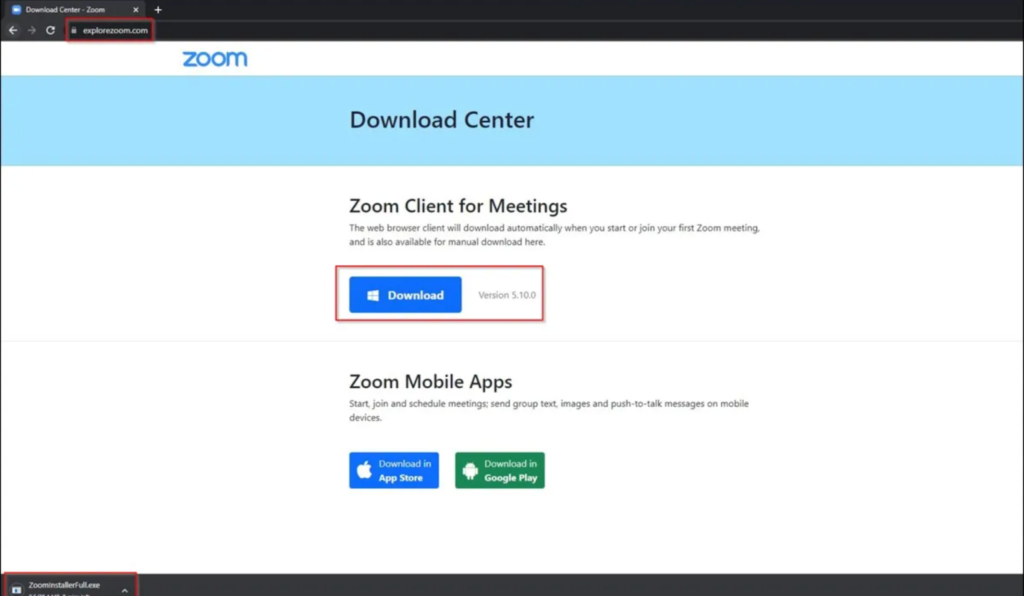
Beware when downloading Zoom. You could be downloading malware along with the application. Source: CRIL
The download URL for the latest IcedID phishing campaign is explorezoom.com, as opposed to the official Zoom.us. This highlights the importance of always checking domains before downloading anything online. Closely examining domain names or URLs can help reveal whether a download is legitimate.
Upon download, the Zoom IcedID malware drops two files into the temp folder: ikm.msi and maker.dll. Ikm.msi is a legitimate Zoom file, put there intentionally to lull suspicion. Users downloading from the link may use the application unaware of the threat. The second file, maker.dll, is highly malicious. It’s initiated using rundll32.exe with the “init” parameter. When executed, it uploads the IcedID malware into the memory.
The IcedID malware is a 64-bit DLL file that uses the following Windows API functions to gather user information and converts the output into numerical data:
GetTickCount64()
ZwQuerySystemInformation()
RtlGetVersion()
GetComputerNameExW()
GetUserNameW()
GetAdaptersInfo()
LookupAccountNameW()
CPUID
Later, in the final stage of malware execution, IcedID assigns an ID to the converted numbers and sends them to the C&C server as a cookie. The malware then deploys more malware strains in the %programdata% directory of the C&C server.
IcedID Malware IOCs and Recommendations
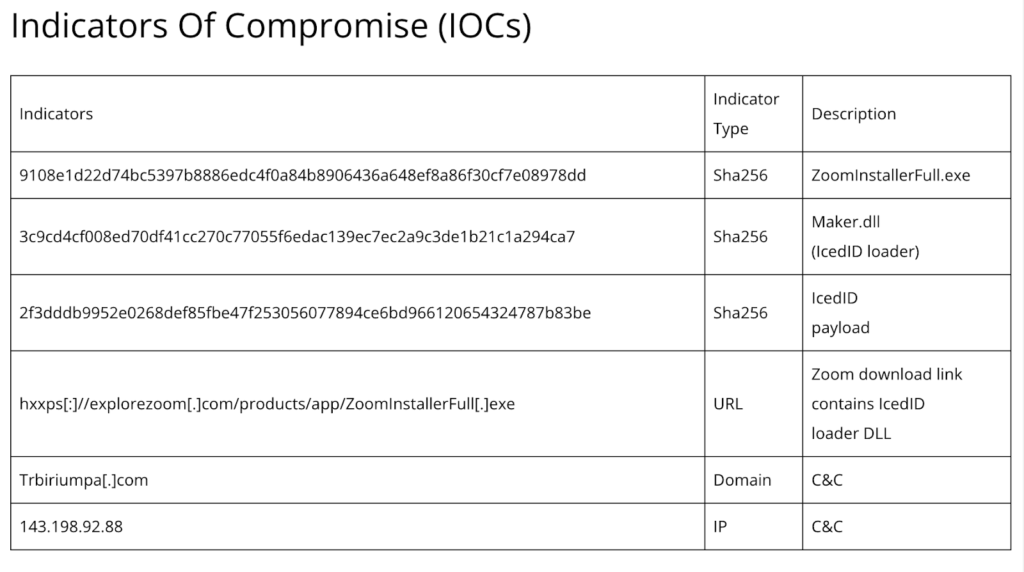
Network admins should know the ins and outs of IcedID malware to stay ahead of the curve. Source: CRIL
CRIL has listed the indicators of compromise (IOCs), including the malicious link, SHA addresses, domains, and IP addresses. This is useful information for security researchers and network administrators, who can use it to avoid falling prey to the same threats. CRIL has also listed some security recommendations, which are often standardized after a cybercrime event. These include:
Enforcing strong passwords and 2FA as much as possible
Using a high-quality malware scanning tool in tandem with antivirus software
Holding employee awareness training for suspicious URLs, particularly in email links
Blocking known malware-distributing URLs
Out of all the recommendations, companies shouldn’t underestimate the importance of malware detection and antivirus tools. Even if these fail to prevent the initial breach, they reduce the detection time and, thus, limit the cost and severity of an attack. Early detection helps contain the threat within a few hours rather than weeks or months. This has major cost implications for businesses.
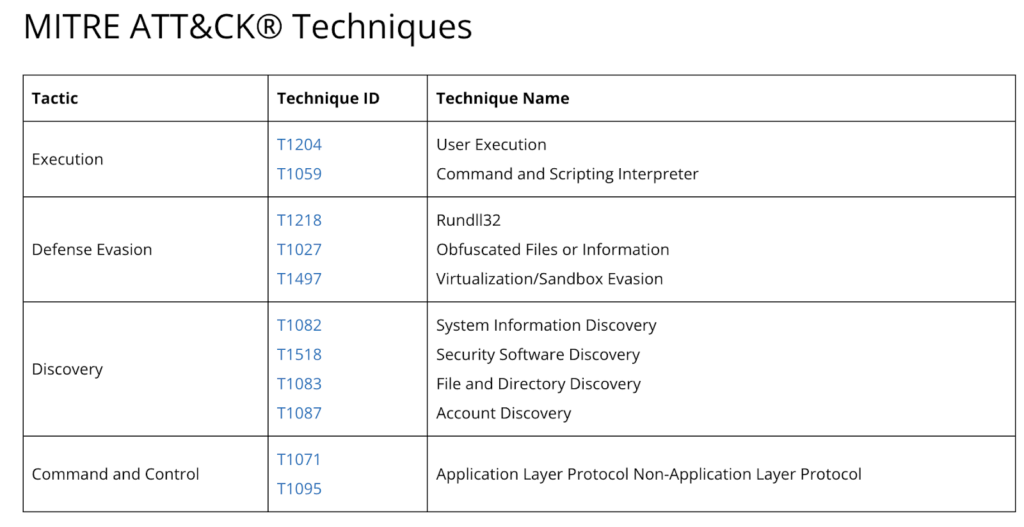
In its report, CRIL has also detailed the methods of attack used in this latest IcedID malware campaign to help network administrators and business owners identify the attack patterns. These include T1071 and T1095 C&C tactics, which relate to application and non-application layer protocols. Execution tactics include T1204 and T1059, which relate to user execution and the command and scripting interpreter.
Updated attack vectors often pass by undetected. Source: CRIL
Since the Covid-19 pandemic, cybercriminals have increasingly sought to compromise remote work applications like Zoom. Two reasons that make such applications such prime targets for cybercriminals are their widespread adoption and that they serve as means to access more lucrative businesses outside a highly secured network.
The issue here isn’t just the scale of these attacks — but that these are becoming increasingly adaptive and versatile with time. Cybercriminals are continually tweaking and adapting their models, leaving researchers a step behind in mapping their attack patterns and developing software that can fend them off.
Commenting on the threat posed by IcedID, CRIL refers to it as a “highly advanced, long-lasting malware that has affected users worldwide.” Cybercrime groups, including Emotet, TrickBot, and Hancitor, have also deployed IcedID malware. Though it’s usually spread through email phishing, cybercriminals created a phishing site to carry the malware in this instance. This also marks the first time that threat actors have used such tactics for deploying IcedID malware.
Yet, despite their sophistication, such attacks are easy to mitigate. For instance, users only need to practice a little awareness and caution to discern the legitimacy of software applications. Email phishing attacks often contain grammatical errors, typos, and poor English.
Moreover, some websites intentionally use incorrect URLs, known as typosquatting, to masquerade as the original website it’s impersonating. Hurried employees looking to download applications quickly may overlook these subtle signs and unwittingly invite trouble.
While commercial and enterprise networks may prevent these downloads automatically, remote employees who can navigate any site may be more at risk from the IcedID variant. Since many businesses nowadays employ large remote staff, this could spell disaster for the safety and integrity of a company’s internal communication and sensitive information.
The Key to Staying Safe from Malware in 2023
The best way to remain safe from malware online is to take a pause before downloading an application from any site, as legitimate as it may seem. Cybercriminals are even exploiting Google Ads to rank their phishing site higher in the SERPs to assume legitimacy and trick users into downloading from malicious links.
Aside from Zoom, other applications targeted through the MasquerAds campaign include AnyDesk, Dashlane, Grammarly, Malwarebytes, Microsoft Visual Studio, MSI Afterburner, Slack, Audacity, Teamviewer, Brave, and more. Under such circumstances, a user’s best defense is exercising vigilance online. A momentary pause and a closer look can reveal what even sophisticated software might fail to detect.
Does your computer have the proper protection to defend you from advanced threats? Source: iStock Photo – Courtneyk
Malware is a serious threat to both individuals and enterprises. It can compromise your sensitive data, disrupt operations, and even cause physical damage to computer systems. That’s not the end of the rope, though. If malware infects your system, it could severely damage your company’s reputation in the case of a data breach. In addition, data breaches usually require a settlement to affected customers, which is very costly. As if regular malware wasn’t enough, we’ve got bigger, smarter, and worse malware out there. So, it’s important to have advanced malware protection in place to protect your enterprise.
In this article, I’ll define advanced malware protection and its importance for your business. You’ll also gain a complete understanding of its 4 different types. So without further ado, let’s find out what advanced malware is.
What Is Advanced Malware?
Malware includes many different types like viruses, worms, Trojans, ransomware, etc. Each type has its own unique characteristics and can cause different types of damage. For example, a virus might replicate itself and spread to other devices. Meanwhile, ransomware might encrypt important files and demand a ransom for their release. Advanced malware can also evade detection or act like a friendly file. We haven’t seen these actions before, and they require better protection. Clearly, you need to deploy the big guns to safeguard your enterprise.
What Is Advanced Malware Protection?
Advanced malware protection (AMP) involves using specialized tools and techniques to detect, prevent, and respond to malware threats on a network or system. This can include a variety of approaches like antivirus software, firewalls, intrusion detection and prevention systems, and sandboxing. This also includes incident response plans and forensic analysis to help respond to and mitigate the impact of malware attacks.
Advanced malware protection is critical for helping businesses protect their networks and systems against cyber threats. It’s also critical for preventing cybercriminals from stealing sensitive data. It also stays up to date with evolving threats and provides multiple protection layers to help defend against new and sophisticated malware attacks.
So, employing advanced malware protection allows you to better protect yourself, your company, and your bottom line from cybercriminals. Malware has evolved so much, and you’ll need this advanced protection.
Drawbacks of Regular Malware Protection
One of the main drawbacks of common malware protection is that it may not be sufficient to better protect against sophisticated malware threats. For example, antivirus software relying on signature-based detection may not be able to detect new or unknown malware. On the other hand, advanced threats may bypass firewalls and intrusion prevention systems relying on rules-based approaches.
In addition, SMBs may face significant security risks if they rely on common malware protection while being attacked by advanced malware. Without advanced protection, they may be more vulnerable to data loss, downtime, and other negative impacts of malware attacks.
Now, let’s see why your business needs advanced malware protection.
5 Reasons Why Advanced Malware Protection Is Important
Advanced malware protection is important for many reasons, but most of all, it’s the prevention that counts. You want to ensure the safety of your data to avoid a costly settlement in case something happens to your data. Let’s look at how APM can benefit you:
1. Protects against Malware Threats
Malware threats are constantly evolving and becoming more sophisticated. This puts you at a higher risk of being attacked and losing valuable assets like data. So, it’s important to have protection that can adapt and stay up to date with new threats. Advanced malware protection uses different approaches to help defend against these threats. These approaches include machine learning algorithms and regular updates. You can think of it as artificial intelligence against malware.
2. Protects against Data Loss
Malware attacks can result in the loss or theft of sensitive data in your system. In return, this can result in serious consequences for your business and costly ones too. Advanced malware protection helps to prevent these attacks and protect against data loss. It also helps prevent the execution of malware on a network or system in the first place.
3. Protects against Downtime
Malware attacks can also cause disruptions and downtime. This can be costly and disruptive for businesses and enterprises. Advanced malware protection helps to minimize these disruptions and protect against downtime.
4. Detects and Removes Unknown Threats
Advanced malware protection can detect and remove malware that is still unknown to the security community. Traditional malware protection involves identifying known threats based on their unique characteristics or “signatures.” But new malware is constantly being developed. This means it can take time to identify these signatures and add them to security software. Advanced malware protection, on the other hand, uses more sophisticated techniques, like machine learning and advanced AI, to identify potential threats even if they don’t match any known signatures.
5. Prevents Malicious Installations
Another important benefit of advanced malware protection is that it can prevent malware from being installed in the first place. Many malware threats make it to your network through phishing attacks or other forms of social engineering. In these cases, the victim falls into the trap of downloading and installing malicious software. Advanced malware protection can block these attempts and prevent the malware from being installed on the system.
Now that you know why advanced malware protection is a must, you may wonder what’s running under the hood. Let’s see.
What’s Involved in Advanced Malware Protection?
Advanced malware protection is critical for helping businesses protect their networks and systems from cyber threats. As we discussed above, advanced malware protection involves 3 different approaches, including:
1. Detection
Advanced malware detection involves using specialized tools and techniques to identify and detect malware. This includes different approaches like:
Signature-based detection, which looks for known malware patterns
Behavior-based detection, which monitors the behavior of programs and looks for anomalies indicating the presence of malware
In addition, advanced malware detection systems may use machine learning algorithms to analyze data and identify potential threats. They also regularly update their databases with new malware signatures to keep up with evolving threats. Overall, advanced malware detection is critical for protecting businesses and enterprises and preventing sensitive data loss or theft.
2. Prevention
Advanced malware protection has many prevention methods like:
Antivirus software, which scans files and blocks the execution of known malicious software
Firewalls, which block unauthorized network traffic
Intrusion prevention systems, which monitor network traffic for signs of malicious activity and block it before it can execute
Advanced malware protection systems may also use machine learning algorithms to analyze data and identify potential threats. So, they help protect your business’s network and prevent the loss of sensitive data.
3. Response
To effectively respond to and mitigate the impact of malware attacks on a network or system, advanced malware protection has several approaches to responding that include:
Incident response plans, which outline the steps to be taken in the event of a malware attack
Forensic analysis, which involves analyzing the attack and determining how the malware was able to bypass security
Containment and eradication measures like isolating infected systems or devices from the rest of the network or cleaning and repairing systems to remove any remaining traces of malware
Essentially, the response aspect is critical for helping businesses quickly and effectively respond to malware attacks. They also help minimize these attacks’ impact on the network or system.
Now, let’s take a look at the 4 different types of advanced malware protection.
Malware is getting stronger, but so are our defenses. Source: Ahmed Adly
4 Types of Advanced Malware Protection
Here, we’ll take a look at the different types of advanced malware protection. Understanding these types allows you to better protect your email and systems, avoid costly data breaches, and more!
1. Cloud-Powered Cybersecurity
Cloud-powered cybersecurity involves using cloud computing technologies to provide security solutions for your business. These solutions can include services like cloud-based antivirus and malware protection, firewalls, and intrusion detection and prevention systems.
Since it’s in the cloud, you can access and manage cloud-powered cybersecurity solutions remotely. This makes it easier for businesses to protect their networks and data from threats. The security solutions are hosted in the cloud. So, you can scale them up or down to meet the changing needs of your enterprise.
Cloud-powered cybersecurity solutions can also provide additional benefits like increased reliability and uptime. In addition, they provide reduced costs compared to traditional on-premises security solutions. For example, businesses can pay for only the security services they need rather than investing in expensive hardware and software upfront.
2. Rapid and Seamless Cybersecurity Deployment
Rapid and seamless deployment allows you to integrate new technologies, systems, or applications into a network or environment without disrupting normal operations. This can be particularly important in cybersecurity, where it’s often necessary to deploy new security controls or updates to protect against new threats.
AI or algorithm-based cybersecurity solutions often provide administrators with an abstraction layer to help with deployment, configuration, and management. This control layer sits between you and system settings allowing it to directly manage port blocking, web filtering, etc.
During deployment, you simply have to answer a few questions about your security goals, and the software does the rest. All connected network devices are mapped and security configured according to the administrator’s goals. This makes deployment to highly complex networks far easier and ensures you don’t miss vulnerabilities.
Automated sandboxing is a security technique that involves executing potentially malicious code in a controlled environment. Sandboxing helps determine the malware’s behavior and assess its potential risk. You can use it to detect and prevent the execution of malicious code on a network or system, helping to protect against cyber threats.
Automated sandboxing typically involves using specialized software to create an isolated and virtualized environment. This allows the execution of potentially malicious software without affecting the rest of the system or network. In return, security analysts can observe its behavior and assess its potential risk.
Using automated sandboxing as part of a cybersecurity strategy has several benefits. For example, it helps identify and prevent the execution of malware before it can cause harm, like the loss of sensitive data. You can also use it to evaluate the effectiveness of security controls and identify any weaknesses that need addressing. Finally, you can use automated sandboxing can analyze and classify new types of malware. This helps improve the overall security of a network or system and ensures the safety of your data.
4. Adding and Securing Multiple Entry Points
Multiple entry points refer to having multiple ways for users to access a network or system. This can be useful for several reasons, like providing backup access in case of a failure or outage. It also enables different groups of users to access the network or system from different locations.
You can implement multiple-entry points in a network or system in several ways. One common approach is a Virtual Private Network (VPN). It allows users to connect to a network or system remotely using an encrypted connection over the internet. This helps enable remote access from anywhere with an internet connection.
Another approach is Remote Desktop Protocol (RDP). It’s a protocol that allows users to remotely access and control a computer or device from another location. This helps enable remote access to specific computers or devices on a network or system.
In addition, you can add secondary routers to a network to increase the number of access points available. To improve wireless network coverage, you often see wireless routers added where signal dead spots occur.
Adding multiple entry points enables you to improve network availability to users. When adding these access points, you also add ways for bad actors to access your network and deploy malware. Advanced malware protection solutions can help reduce the risk of malware passing your perimeter and running riot inside your network.
Let’s recap what we’ve covered!
Final Thoughts
Advanced malware protection is essential to any robust cybersecurity strategy. It protects your enterprise against many different threats. It also provides an additional layer of defense against sophisticated cyber attacks. This is important to succeed in combating cybercriminals and preventing costly data breaches. Whether you’re an individual concerned about protecting your data or an enterprise responsible for protecting critical infrastructure, advanced malware protection is an important investment in your security.
Do you still have some lingering questions? Would you like to read more about AMP and similar topics? Read the FAQ and Resources sections below.
Malware, short for “malicious software,” refers to any software designed to harm or exploit a computer system or network. Malware can take many forms, including viruses, worms, Trojans, ransomware, adware, and spyware. It can make it to your network and system through various means like email attachments, infected websites, or drive-by downloads. Once it does, malware can perform many harmful actions like stealing sensitive information, deleting or corrupting data, or using the system to attack other computers.
Can a firewall prevent a malware attack?
Firewalls block or limit incoming and outgoing network traffic based on predetermined security rules to prevent cyber attacks. A firewall acts as a barrier between a trusted network, like a private home network, and an untrusted network, like the internet. It can help protect against external threats by blocking traffic from known malicious sources, like known malware-infected servers or IP addresses. It can also inspect incoming traffic for signs of malicious activity. To be most effective, you should pair firewalls with other security measures.
How does advanced malware differ from other types of malware?
Advanced malware is typically more sophisticated and difficult to detect than other forms of malware. That’s because it’s designed to avoid detection by traditional security measures like antivirus software and firewalls. It may also use complex tactics to infiltrate a system, like zero-day vulnerabilities and spear-phishing attacks.
How do I know if my system has been infected with advanced malware?
It can be difficult to detect advanced malware, as it’s designed to evade detection. That said, some signs may indicate a possible infection. Some of these signs are unusual system behavior or performance, strange network activity, or the presence of unfamiliar files or programs.
How long do advanced malware campaigns last before detection?
It’s difficult to determine the average time an advanced persistent threat (APT) campaign lasts before detection. This is because it can vary widely depending on several factors. Some APT campaigns have been active for years before detection. Meanwhile, others have been detected within weeks or even days of their inception.

 Connexion
 Contrairement aux attaques par rançongiciels, les stealers ou infostealers (information stealer ou voleur d’informations en français) sont pour le moment encore une menace méconnue du grand public. Il s’agit d’un logiciel espion utilisé pour récupérer des informations sur votre appareil, à votre insu. Il fouille votre ordinateur et transmet les données trouvées aux malfaiteurs. Cela peut aller d’un suivi de votre activité en ligne, au vol de mot de passe, voire une usurpation d’identité. Comment opère l’infostealer? Une fois installé […]