Connexion
Manually re-register a Windows 10 / Windows 11 or Windows Server machine in Hybrid Azure AD Join
Hybrid Azure AD Join devices are machines under Windows 10+ or Windows Server 2016+ that are:
- Joined to an on-premises Active Directory domain
- Registered in Azure AD as a hybrid device
Having a Hybrid Azure AD Joined device enables the following features:
- Automatic device enrollment in Microsoft Intune
- Device-based conditional access for corporate devices
- Backup of the BitLocker recovery key in Azure AD
- Sync of some Windows settings by the Enterprise State Roaming
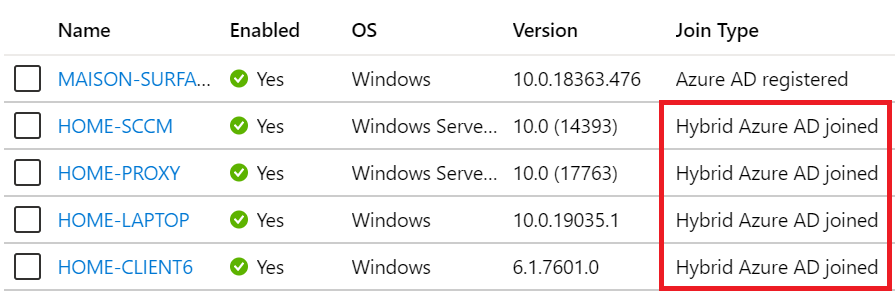
Sometimes, a machine can be in an inconsistent registration state in Azure Active Directory. This can happen because:
- The machine was shut down during a long time, and the Azure AD device registration certificate is expired (located in Local Machine / Certificates / Personal)
- Someone manually deleted the device registration certificate
- Someone manually deleted the device object in the Azure AD portal
- The machine is registered in another Azure AD tenant
Please note that this method will only succeed if your organization meets all the prerequisites for Hybrid Azure AD Join. For more information, please refer to this documentation.
Step 1: Unregister the device from Azure AD
Follow this procedure:
- On the machine to unregister, launch a Command Prompt as an administrator and type the following command:
dsregcmd /leave- Make sure the certificates issued by “MS-Organization-Access” and “MS-Organization-P2P-Access [xxxx]” have been deleted from the local machine Personal certificate store:

- Type the command dsregcmd /status in a Command Prompt, and make sure the following parameters have the appropriate values:
dsregcmd /status

+----------------------------------------------------------------------+
| Device State                                                         |
+----------------------------------------------------------------------+
AzureAdJoined : NO  <-----
EnterpriseJoined : NO
DomainJoined : YES  <-----
Step 2: Re-register the device as a Hybrid Azure AD Join
Follow this procedure:
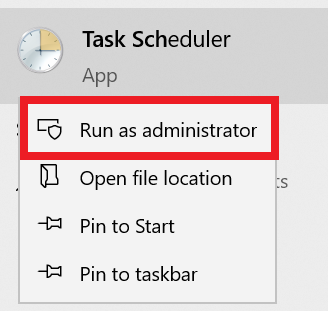
- On the machine to re-register, run the Task Scheduler as an administrator.
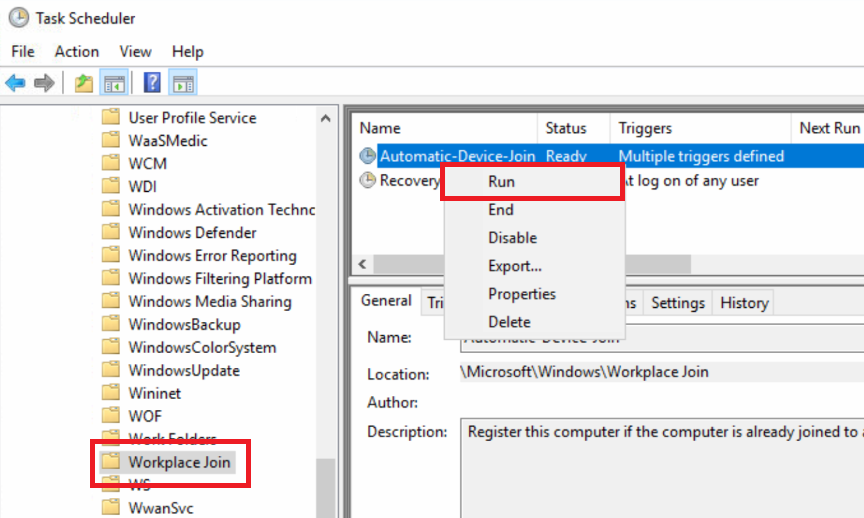
- Go to Task Scheduler Library > Microsoft > Windows > Workplace Join and manually start the task “Automatic-Device-Join“.
- Make sure the certificates issued by “MS-Organization-Access” and “MS-Organization-P2P-Access [xxxx]” have been created in the local machine Personal certificate store:
- Type the command dsregcmd /status in a Command Prompt, and make sure the following parameters have the appropriate values:
dsregcmd /status

+----------------------------------------------------------------------+
| Device State                                                         |
+----------------------------------------------------------------------+
AzureAdJoined : YES  <-----
EnterpriseJoined : NO
DomainJoined : YES- Reboot the PC.
- Start an Azure AD Connect delta synchronization.